If you’re searching for an AI that’s truly proficient in French, look no further than Mistral AI. But what exactly is Mistral AI, and how does it compare to ChatGPT? Let’s dive into the story of this extraordinary startup that skyrocketed to a $6 billion valuation just 14 months after its launch.
Before we get started, a quick note:
- Mistral AI is the company.
- Le Chat is their free chatbot, sometimes referred to as Le Chat Mistral. If you’re here just to learn how to use their chatbot, feel free to jump ahead to the Le Chat section. Otherwise, stay with us as we explore more about this rising star.
Meet Mistral AI
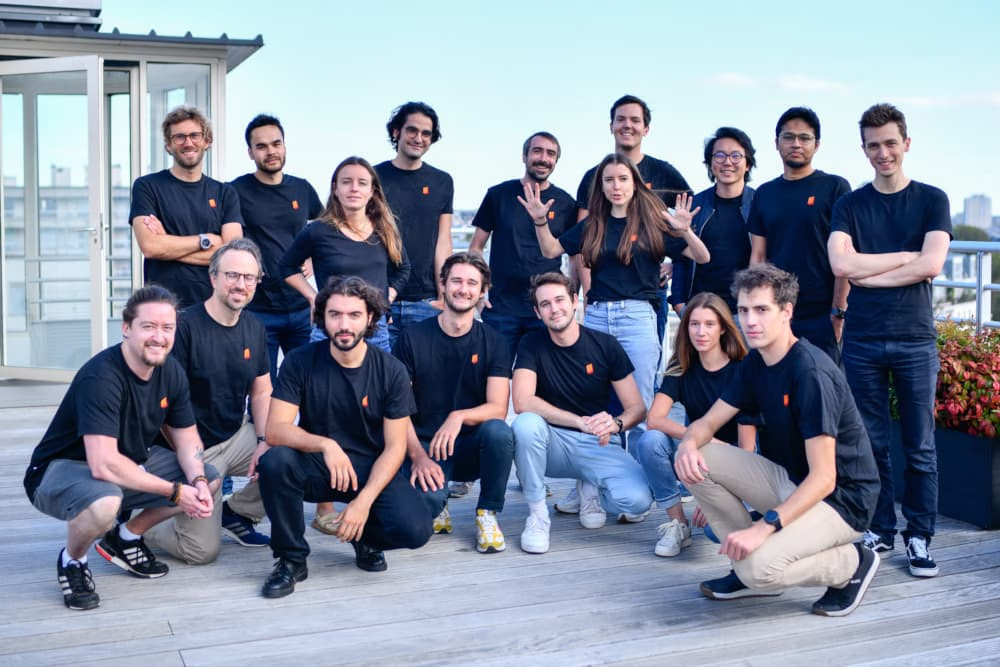
Founded in April 2023 in France by Arthur Mensch, Guillaume Lample, and Timothée Lacroix, Mistral AI quickly assembled a powerhouse team. Their founders boast impressive credentials:
- Arthur Mensch previously worked at Google DeepMind.
- Guillaume Lample and Timothée Lacroix both came from Meta AI (formerly Facebook) in France.
The three, all in their early thirties, first crossed paths as students at the prestigious École Polytechnique.
Mistral AI’s mission is clear: to democratize AI, making it more accessible and useful for developers and businesses. The name “Mistral” itself symbolizes their ambition — much like the strong, cold wind that sweeps through southern France, they aim to make a powerful impact on the AI landscape.
Mistral AI’s Rapid Rise
In just a year, Mistral AI has achieved remarkable milestones:
- June 2023: Raised €105 million in seed funding, with backing from major investors like Lightspeed Venture Partners, Eric Schmidt, Xavier Niel, and JCDecaux.
- December 2023: Secured another €385 million in Series A funding, with participation from Andreessen Horowitz, BNP Paribas, and Salesforce.
- December 2023: Hit a valuation of over $2 billion.
- February 2024: Announced a major partnership with Microsoft to integrate their language models into Azure’s cloud platform.
- April 2025: According to TechCrunch, after a Series B round raising $640 million, Mistral AI is now valued at an astonishing $6 billion.
Such rapid growth has propelled Mistral AI into a leading position within the highly competitive AI sector. Their technology is already being adopted by big names such as Orange, CMA CGM, and BNP Paribas, as well as AI-focused startups like Hugging Face, MongoDB, Cloudflare, and OctoAI.
Backed by world-class investors and high-profile partners, Mistral AI is not only shaping the future of European AI but could also become a global powerhouse.
Use Cases for Le Chat Mistral
To be honest, from a casual user’s perspective, I feel that Le Chat Mistral still isn’t quite there yet. 😅 So it’s a bit tricky for me to recommend everyday use cases in good faith.
However, if you’re a business looking to build AI-powered services, Mistral AI offers a lot of strong advantages — especially when it comes to cost efficiency. So, I’ll focus more on the use cases for developers and companies who want to leverage this technology.
Content Creation and Marketing
- Generate engaging blog posts, articles, and social media content
- Craft compelling ad copy and product descriptions
- Brainstorm ideas for campaigns and content strategies
- Provide writing suggestions and editing assistance
Customer Service and Support
- Deploy smart chatbots to handle common customer queries 24/7
- Sort and route customer requests to the right teams
- Assist support agents with suggested replies and relevant information
- Analyze customer feedback and sentiment to identify improvement areas
Software Development
- Generate code snippets and function templates
- Offer context-aware code autocompletion
- Explain complex code and generate documentation
- Detect and suggest fixes for bugs
- Translate code between different programming languages
Research and Data Analysis
- Summarize long research papers and articles
- Extract key data and insights from reports
- Perform sentiment and opinion analysis on large datasets, like social media posts
- Formulate hypotheses and research questions based on existing literature
- Assist in writing and editing research papers
Education and Training
- Create personalized quizzes, exercises, and assessments
- Offer intelligent tutoring and real-time feedback
- Answer student questions and help with homework assignments
- Generate study guides and course material summaries
- Support language learning through interactive conversation practice
These are just a few examples — the possibilities with Mistral AI are much broader. Thanks to its open-source approach, you can freely download Mistral’s models and fine-tune them on your own datasets.
Alternatively, if you prefer not to manage your own infrastructure, you can access their models via API — you’ll just need to dive into the documentation and explore it yourself.
Mistral AI’s Available Models
One major thing that sets Mistral AI apart is their strong commitment to open-source technology and empowering the AI community.
Which makes sense, considering their early models were built off Meta’s LLaMA framework. 😄
Mistral has released several powerful open models under the Apache 2.0 license — meaning you’re free to use, modify, and distribute them however you like.
Here’s a quick overview of their key open-source models:
- Mistral 7B: A 7.3 billion parameter transformer model. Despite its size, it outperforms larger models like LLaMA 2 13B. It uses Grouped-Query Attention (GQA) for better efficiency.
- Mixtral 8x7B: A Sparse Mixture-of-Experts (SMoE) model with 45 billion total parameters but only activates 12.9 billion at a time. It performs extremely well across multiple languages (English, French, Italian, German, Spanish) and coding tasks. Mixtral 8x7B even outpaces LLaMA 70B and GPT-3.5 on many benchmarks.
- Mixtral 8x22B: Currently Mistral AI’s highest-performing open model. This SMoE model has 141 billion total parameters but activates just 39 billion during use, offering strong multilingual and coding abilities similar to Mixtral 8x7B.
- Codestral 22B: A lightweight model fine-tuned for coding tasks. It supports over 80 programming languages and offers highly efficient code generation compared to much larger models.
Because these models are open, many third-party groups have taken them and created their own fine-tuned versions — some pretty wild ones too. For example, Dolphin 2.5 is known for being an “uncensored” chat model with basically no filters.
Just a heads up though — if you want to try those versions (like on Hugging Face), it’s completely at your own risk. Don’t say I didn’t warn you! 😆
Mistral AI’s Commercial Model Lineup
Beyond its open-source releases, Mistral AI also offers a suite of optimized commercial models tailored for high performance. These models are accessible through an API and via major cloud platforms like Microsoft Azure.
Here’s a quick overview of their main commercial offerings:
- Mistral Large: The flagship model from Mistral AI, delivering performance that closely rivals GPT-4 across a range of benchmarks. It excels in complex reasoning tasks, supports multiple languages, and handles coding-related activities with impressive skill.
- Mistral Small: Designed for workloads where low latency and cost efficiency are key, Mistral Small maintains strong multilingual capabilities and coding proficiency similar to its larger counterpart.
- Mistral Embed: A specialized model that transforms text into high-dimensional vector representations, enabling advanced semantic analysis for various natural language processing tasks.
These models provide businesses and developers with cutting-edge AI capabilities, combining convenience and scalability through API-based services. Thanks to partnerships with major cloud providers like Microsoft Azure, Mistral AI is expanding the reach and accessibility of its technology.
If you’re curious to try them out, you can visit their API page — they even offer free credits for new users. As for usage statistics or revenue figures, those haven’t been publicly disclosed yet.
Introducing Le Chat: Mistral AI’s Conversational Assistant
What is Le Chat?
Le Chat (or Le Chat Mistral) is Mistral AI’s conversational assistant, offering users a friendly chat interface to interact with various Mistral language models.
One of Le Chat’s standout features is its flexibility — users can choose which Mistral model powers their assistant:
- Mistral Large: Best for complex, deep conversations requiring advanced reasoning.
- Mistral Small: Optimized for quick, efficient responses, making it ideal for simpler queries.
- Mistral Next: A prototype model designed to deliver short, precise answers.
- Mistral Codestral: A specialized model for code generation tasks, available for free directly within the chat experience.
Le Chat is capable of understanding context, tone, and even emotional nuance in user prompts, enabling more natural and meaningful interactions — particularly in English. (Support for French hasn’t been thoroughly tested yet.)
While still technically in beta, Le Chat already demonstrates impressive language understanding and generation skills. It’s useful for a wide range of tasks, from brainstorming and creative writing to answering questions and explaining various topics.
Pros and Cons of Mistral and Le Chat
Pros:
- Completely free to use
- Full access to four paid models without extra cost
- Each model is optimized for specific types of tasks
- Strong reasoning abilities, comparable to GPT-3.5
- Open models available for personal fine-tuning and customization
- More affordable compared to many AI solutions on the market
- High response speed, suitable for diverse use cases
- Better memory capabilities than GPT-3.5 (a significant advantage!)
- Recent updates have improved Vietnamese language handling dramatically
Cons:
- Reasoning still lags behind the latest models like GPT-4o, Claude 3, or Gemini 1.5
- Some responses can be confusing or unclear
- Vietnamese language support is decent but not flawless
- The Le Chat interface is very basic — strictly chat only, no multimedia capabilities yet
- No option to custom-tailor your chatbot for specific workflows as you can in ChatGPT
Despite its current limitations, Le Chat Mistral shows a lot of promise. Just like early versions of ChatGPT, it’s likely to evolve rapidly with further updates and refinements to eventually rival the top AI chat platforms.
How to Use Le Chat
You can use Mistral AI for free with no login required, and choose from multiple models on MiniToolAI here: Mistral AI
Getting started with Le Chat Mistral is straightforward. Here’s a step-by-step guide to help you set it up:
- Visit the Le Chat Mistral website at chat.mistral.ai.
- Click the “Sign up” button to create a new account. You’ll need to provide an email address and set a password.
- Once your account is created, log in using your credentials.
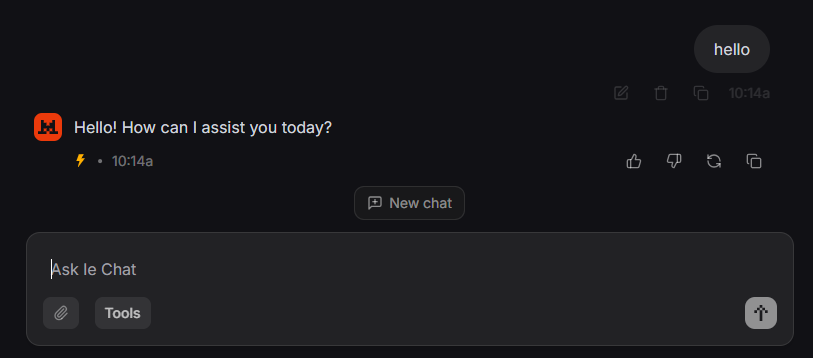
- After logging in, you’ll be taken to the main chat interface where you can begin interacting with Le Chat Mistral.
- Choose the AI model you want to work with:
- Mistral Large: Ideal for complex reasoning.
- Mistral Small: Optimized for speed and efficiency.
- Mistral Next: A prototype model for quick, concise answers.
- Mistral Codestral: Specialized for coding tasks.
- Type your message or question into the input box at the bottom of the chat window, then press Send or hit Enter.
- Le Chat will process your input and respond based on the selected model. Your conversation history will appear in the chat window.
You can continue the dialogue naturally—Le Chat maintains conversation context, making interactions feel fluid and coherent.
Just a heads-up: Le Chat Mistral is still in beta. It doesn’t have live internet access, so some information may be outdated, and like all AI models, it can occasionally produce biased or inaccurate responses.
How to Write Better Prompts for Le Chat
Prompting Le Chat Mistral effectively follows a few core principles—being clear, providing context, and breaking tasks into smaller steps when necessary. Here are some tips to help you craft better prompts:
- Be clear and specific: Give detailed instructions or ask direct questions. The clearer you are, the more focused and relevant the response will be.
- Provide context: If your query involves a specific topic or scenario, share some background information. This helps the model understand the situation and respond more appropriately.
- Break down complex tasks: For multi-step requests, consider splitting them into smaller, manageable parts. This improves accuracy. (If you prefer not to, you might want to try Claude 3, which handles complex prompts without needing much breakdown.)
- Experiment with wording: If a response isn’t quite what you wanted, rephrase your prompt. Sometimes even a slight adjustment can lead to better results.
- Use supported languages: Le Chat Mistral works best with English, French, Spanish, German, and Italian. Feel free to use any of these languages for a more natural conversation.
- Give examples: If you need a specific style or format (e.g., email writing, social media posts, coding), include examples to guide the model.
- Pick the right model: As mentioned above, choosing the most suitable Mistral model for your task ensures you get the best possible response. Unlike ChatGPT, Le Chat does not automatically pick a model for you.
At the end of the day, practice and experimentation are key. The more you interact with Le Chat, the better you’ll understand how to craft prompts that yield great results.
Testing Code with Mistral
For a bit of fun, I tried asking Mistral to help with a simple coding task:
Prompt:
“Please help me create an HTML interface with basic CSS to create a website that translates the word ‘Hello’ into 10 different languages.”
Le Chat’s response:
<!DOCTYPE html>
<html lang="en">
<head>
    <meta charset="UTF-8">
    <meta name="viewport" content="width=device-width, initial-scale=1.0">
    <title>Hello Translator</title>
    <style>
        body {
            font-family: Arial, sans-serif;
            background-color: #f4f4f4;
            margin: 0;
            padding: 0;
            display: flex;
            justify-content: center;
            align-items: center;
            height: 100vh;
        }
        .container {
            background-color: #fff;
            padding: 20px;
            border-radius: 8px;
            box-shadow: 0 0 10px rgba(0, 0, 0, 0.1);
            width: 300px;
        }
        h1 {
            text-align: center;
            color: #333;
        }
        .translation {
            margin: 10px 0;
            padding: 10px;
            border: 1px solid #ddd;
            border-radius: 4px;
        }
        .translation:nth-child(even) {
            background-color: #f9f9f9;
        }
    </style>
</head>
<body>
    <div class="container">
        <h1>Hello Translator</h1>
        <div class="translation">English: Hello</div>
        <div class="translation">Vietnamese: Xin chào</div>
        <div class="translation">Chinese: 你好 (Nǐ hǎo)</div>
        <div class="translation">Spanish: Hola</div>
        <div class="translation">French: Bonjour</div>
        <div class="translation">German: Hallo</div>
        <div class="translation">Italian: Ciao</div>
        <div class="translation">Japanese: こんにちは (Kon'nichi wa)</div>
        <div class="translation">Korean: 안녕하세요 (Annyeonghaseyo)</div>
        <div class="translation">Russian: Привет (Privet)</div>
        <div class="translation">Arabic: مرحبا (Marhabaan)</div>
    </div>
</body>
</html>
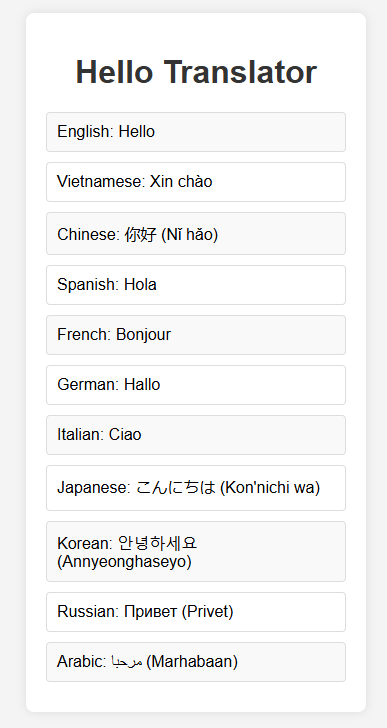
If you want to try it yourself, here’s a quick tip:
Simply copy the generated code into a .txt file, save it, then rename the file extension from .txt to .html. After that, double-click the file to open it in your browser.
(This method is perfect if you’re not a coder but still want to see the result!)
Comparing Mistral vs. GPT-4, Le Chat Mistral vs. ChatGPT
Mistral Models vs. GPT-4: Side-by-Side Comparison
| Feature | Mistral Large | Mistral Small | GPT-4 |
|---|---|---|---|
| Performance | Slightly trails GPT-4 on industry benchmarks | Tuned for speed and efficiency | Best overall performance across industry standards |
| Ideal Use Cases | Complex reasoning, content generation, coding tasks | Simpler tasks like classification, customer support, content creation | Tackles complex, cross-domain tasks |
| Context Window | 32k tokens | 32k tokens | Up to 32k tokens |
| Language Support | English, French, Spanish, German, Italian, coding languages | English, French, Spanish, German, Italian, coding languages | Multilingual, with strongest performance in English |
| Pricing | $8 per 1M input tokens, $24 per 1M output tokens | More cost-effective for low-latency, high-volume tasks | $30 per 1M input tokens, $60 per 1M output tokens |
| Availability | Available via Mistral’s API and selected cloud platforms | Available via Mistral’s API and selected cloud platforms | Available through OpenAI’s API |
Le Chat Mistral vs. ChatGPT: How They Stack Up
| Feature | Le Chat Mistral | ChatGPT |
|---|---|---|
| Base Model | Choose between Mistral Large, Small, or Next prototype | Based on the GPT-3.5 family |
| Multilingual Support | Fluent in English, French, Spanish, German, Italian | Primarily English, some multilingual capabilities |
| Customization | Choose the Mistral model that suits your needs | Limited customization options |
| Real-Time Information | Does not access real-time data; knowledge may be outdated | Limited access to real-time information |
| Cost | Free beta access; enterprise version coming soon | Paid access via ChatGPT Plus or API |
| Unique Features | Choose between reasoning power or speed; “brief mode” with Mistral Next | Reliable performance, wide-ranging knowledge base |
| Potential Limitations | Still in beta; responses may sometimes be biased or inaccurate | Can also produce biased or incorrect outputs |
Summary
While Mistral’s models offer attractive benefits like better cost efficiency and flexible customization, GPT-4 and ChatGPT still hold the crown for top-tier performance and versatility across industries.
Even though Mistral AI hasn’t fully caught up to OpenAI just yet, they’re becoming a serious contender, especially with their open-source approach and strong investor backing. If you’re considering building your own AI-powered application, Mistral AI is definitely worth a look.
With Mistral AI’s rapid growth, significant funding, and commitment to open-source innovation, they’re clearly shaping up to be a major player. Who knows? One day, we might all be using a model even better than GPT-4o—completely free and unlimited! :3
FAQs About Mistral AI and Le Chat
Is Le Chat Mistral free to use?
Yes, Le Chat is currently free to use. I haven’t personally hit any usage limits yet, suggesting either there’s no cap or it’s pretty generous (possibly up to 50,000 tokens or more).
How good is Le Chat’s memory in conversations?
It’s pretty solid—especially compared to GPT-3.5, which typically manages around 6k to 12k tokens (in practice, closer to 6k). Mistral offers a much bigger context window of 32k tokens, making it much more capable for longer conversations.
Should you use Le Chat or ChatGPT?
If you’re interested in testing Mistral’s capabilities before integrating them into your own apps via their API, grinding through Le Chat is a great starting point. But if you’re a casual user like me, ChatGPT is more than enough for everyday needs.
When will Le Chat allow image uploads?
There’s no official announcement yet. If you’re curious about new features, it’s best to keep an eye on Mistral AI’s homepage.
Which AI lets you chat freely without restrictions?
You might want to check out Dolphin 2.5—built on an open-source Mistral model—designed for completely unfiltered conversations.