In today’s fast-paced world, tracking what we eat can be tough — especially when we’re eating out or trying new dishes. But what if you could simply snap a photo of your meal and instantly know its calorie count and nutritional breakdown?
Thanks to AI-powered food recognition technology, that’s now possible. By using tools like MiniToolAI’s Image Description, you can upload a photo of your food and get detailed information about calories, protein, fat, fiber, and more — all within seconds.

How to Identify Food Calories from a Photo
Step 1: Visit the MiniToolAI Website
Open your phone or computer browser and go to MiniToolAI.com.
Step 2: Choose the “Image Description” Tool
From the homepage, select Image Description from the available AI tools.

Step 3: Upload Your Food Photo
Click “Upload your image“, then choose a picture from your gallery, computer, or take one directly using your phone’s camera.
💡 Tip: Make sure the photo clearly shows the food you want to analyze, taken from a direct angle. Wait for the page to fully load before clicking “Upload your image” to avoid errors.
Step 4: Select the “Food Calorie Counter” Model
In the Model section, choose Food Calorie Counter.
Step 5 (Optional): Add Extra Information
You can enter additional details such as the food name or preferred language in the Additional Info box — or skip this step if you want.
Step 6: Click “Generate”
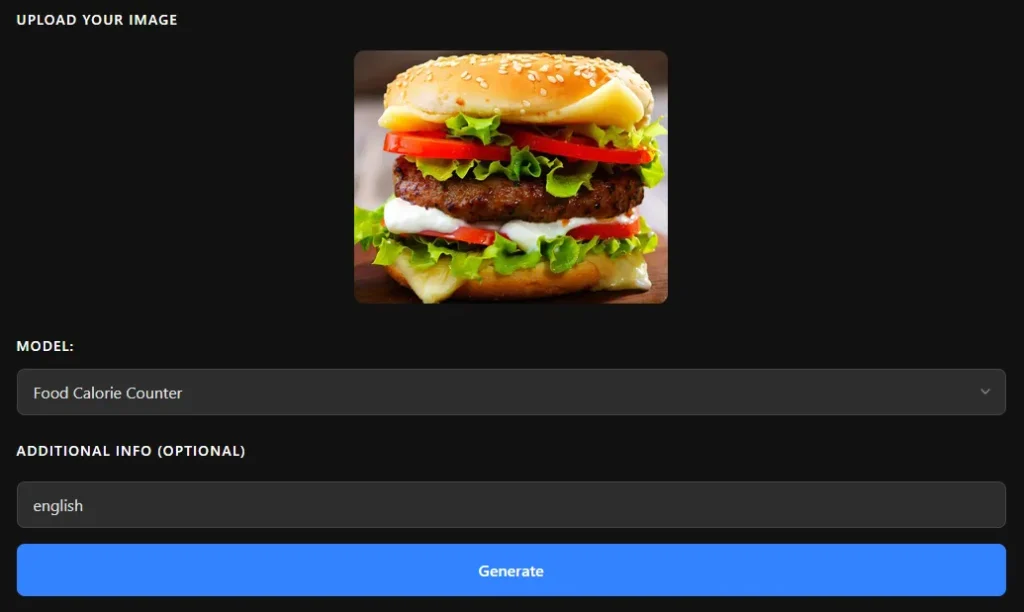
Now just wait a few seconds. The AI will analyze your image and display the calorie count, along with macronutrient information like protein, fat, carbohydrates, and fiber, …
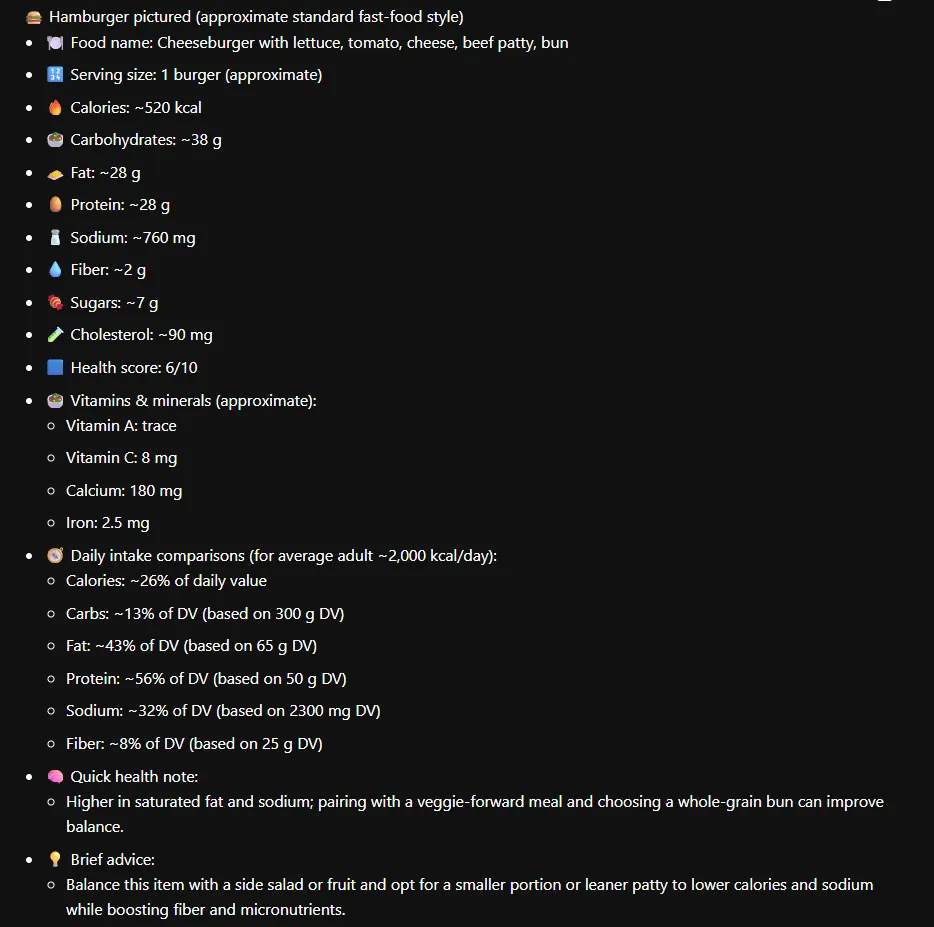
It will also compare your food’s nutritional content with the daily recommended intake for an average person.
Example: Estimating the Nutrition of a Hamburger Photo
I uploaded a picture of a hamburger, and the tool instantly provided a full nutritional breakdown — including calories, protein, fat, and carbs.
What’s even more impressive is that MiniToolAI also gives personalized health notes and quick dietary tips based on the results.
Why Identifying Nutrition Through Photos Matters
Knowing your food’s nutritional value isn’t just about counting calories — it’s about understanding your diet and making smarter choices.
By analyzing food through images, you can:
- Track your intake even when you don’t know exact measurements.
- Stay consistent with fitness or weight-loss goals.
- Discover hidden calories in restaurant dishes or snacks.
- Make better food decisions based on real data, not guesswork.
AI-based calorie recognition makes nutrition tracking fast, convenient, and accessible to everyone — no manual logging or barcode scanning required.
Frequently Asked Questions
Q: Is MiniToolAI’s food calorie calculator free?
✅ Yes! MiniToolAI’s Image Description Generator is completely free to use, with no login required and no usage limits.
Q: Can I upload a photo with multiple foods?
✅ Absolutely. The tool will detect and analyze each food item in the image separately.
Q: How accurate is the AI calorie counter?
🔍 MiniToolAI has been tested on millions of food images and achieves over 95% accuracy in calorie and nutrient estimation.
Q: Can I get the results in another language?
🌍 Yes! Just type your preferred language (for example, “reply in Spanish”) in the Additional Info field before generating your result.
Final Thoughts
Estimating calories and nutrition from a food photo has never been easier. With tools like MiniToolAI, you can quickly analyze any meal — from homemade dishes to restaurant plates — and stay on top of your health goals.
Give it a try today and see how this smart, simple method can make your diet tracking effortless and accurate.