I took a closer look at the Gigabyte AERO X16 to see if, at around 1.500 USD, this laptop is truly worth considering.
Targeted at content creators, the AERO X16 packs serious performance with the AMD Ryzen AI 7 350 processor and the NVIDIA RTX 5060 GPU. In my real-world use, it left a strong impression thanks to its speed and smoothness, but I also found a few shortcomings that kept it from being a perfect all-around machine.
Gigabyte AERO X16 Specifications
CPU: AMD Ryzen AI 7 350 (8 cores, 16 threads)
GPU: NVIDIA GeForce RTX 5060 Laptop, 8GB GDDR7, 85W TGP
RAM: 32GB DDR5 (2 x 16GB SO-DIMM)
Storage: 1TB PCIe Gen4x4 M.2 SSD
Display: 16-inch, 16:10, IPS, WQXGA (2560×1600), 165Hz, 3ms, 100% sRGB, 400 nits
Keyboard: Single-zone RGB backlit keyboard
Ports: 1 x USB4 Type-C (DP 1.4, PD 3.0), 2 x USB 3.2 Gen1 Type-A, 1 x USB 2.0 Type-A, 1 x HDMI 2.1, 1 x RJ45 LAN, 1 x 3.5mm jack, 1 x DC-in
Wireless: Wi-Fi 6E
Battery: 76Wh Li-Polymer
Charger: 150W adapter
Weight: ~2 kg (laptop) + ~0.5 kg (adapter)
Design: Solid and Modern, But Needs Refinement
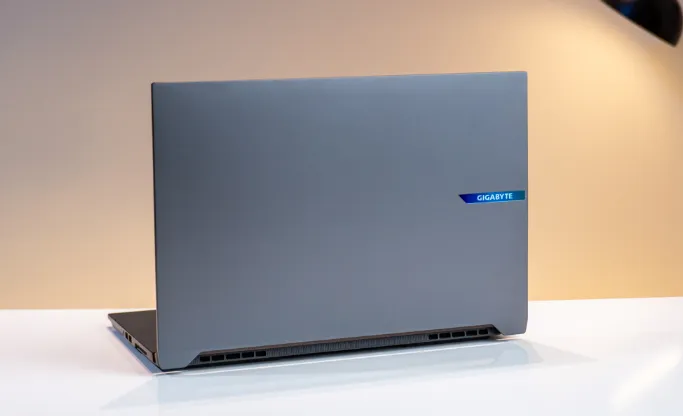
At first glance, the Gigabyte AERO X16 feels premium. The A cover and bottom panel are built from metal, giving the laptop a sturdy and high-end look. The A cover design is minimal, with a subtle Gigabyte logo tucked neatly to the side, which matches the professional vibe creators often want.
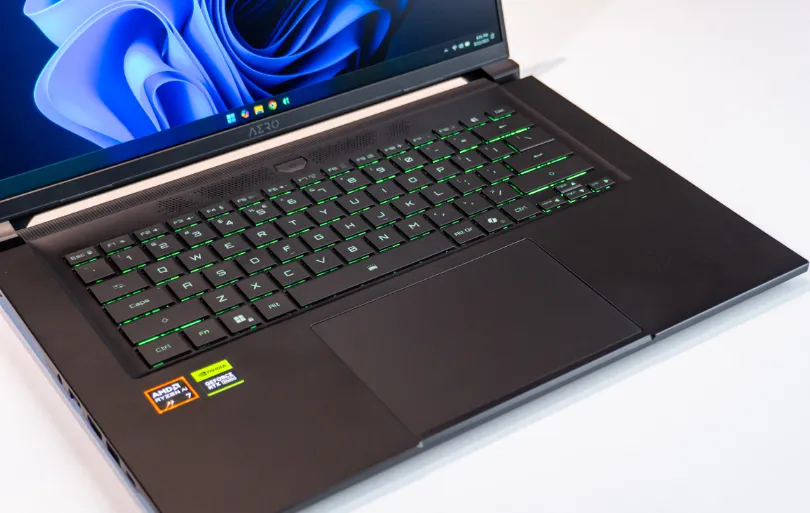
Opening the laptop, the frame and C deck are made from plastic to help reduce weight. While this does keep the laptop lighter, it feels less premium compared to the metal exterior. The hinge is compact and stable, but it doesn’t open fully to 180°, which can sometimes be inconvenient when adjusting the screen angle.
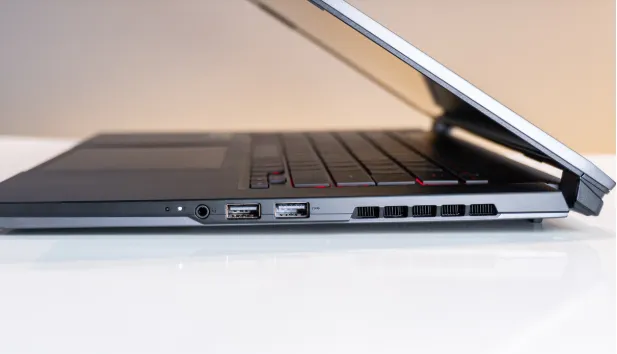
Connectivity is versatile, with enough ports for both office work and creative projects. However, the layout isn’t perfect. The placement of the 3.5mm jack and USB ports on the right side can interfere when using an external mouse. More importantly, the lack of an SD card slot is a major drawback for creators who often work with cameras and need quick access to storage. Without it, I had to rely on an external card reader, which felt like an unnecessary hassle.
Keyboard and Touchpad: A Standout Experience
Unlike the design shortcomings, the keyboard and touchpad are real highlights on the AERO X16. The keyboard comes in a balanced layout without a numpad, positioned neatly in the center. Typing feels excellent thanks to deep key travel and satisfying feedback, comparable to top gaming laptops like the Lenovo Legion. The RGB backlight may only be single-zone, but it still adds a subtle gaming vibe when needed.
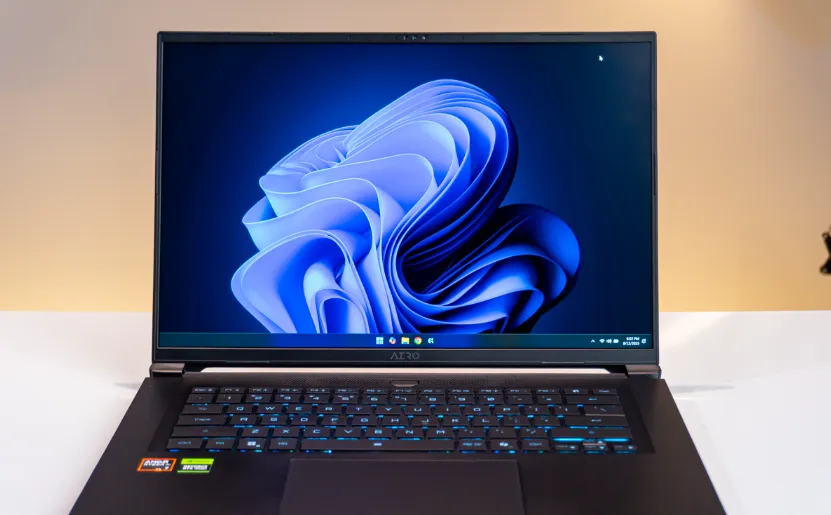
The touchpad is equally impressive, with a smooth surface, precise tracking, and light yet responsive clicks. I found it comfortable enough for office tasks and web browsing without needing an external mouse. One small drawback is that the dark-colored C deck collects fingerprints easily. I tested cleaning it with Flash Wipe cloths from Hyperwork, which worked quickly, especially on textured areas. However, since these wipes are quite strong, I wouldn’t recommend using them directly on the display or glass surfaces with coatings.
Display: Strong Specs, Good Enough Quality
The AERO X16 features a 16-inch 2K+ (2560×1600) display with a 165Hz refresh rate and 100% sRGB coverage. The high refresh rate makes games and animations feel buttery smooth, which is a big plus for both gamers and creators.
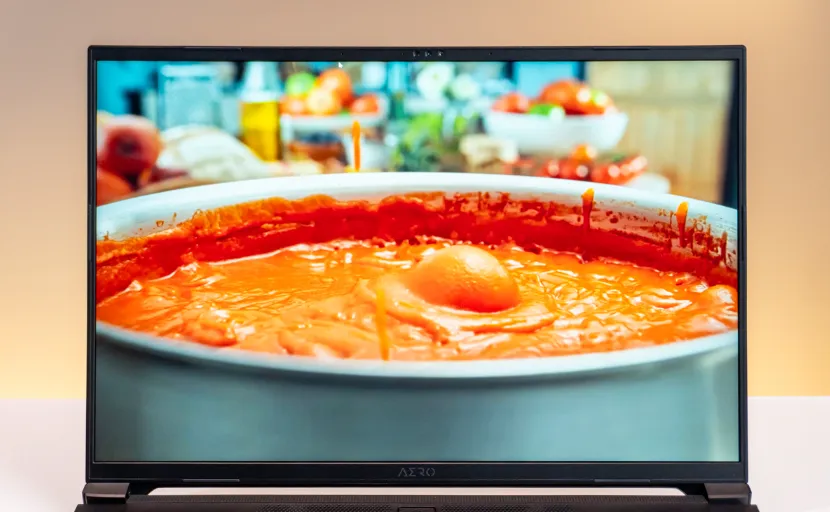
That said, color accuracy leans toward neutral tones and doesn’t quite reach the precision required for professional color grading. For light video editing, photo work, or productivity, the screen is more than adequate. To keep it clean, I used Hyperwork’s Hyper Cleaning solution and microfiber cloths, which safely remove dust and smudges without streaking or damaging the anti-glare coating. It’s a small accessory that’s surprisingly useful for keeping the laptop presentable on the go.
Performance and Real-World Use: An SSD Bottleneck
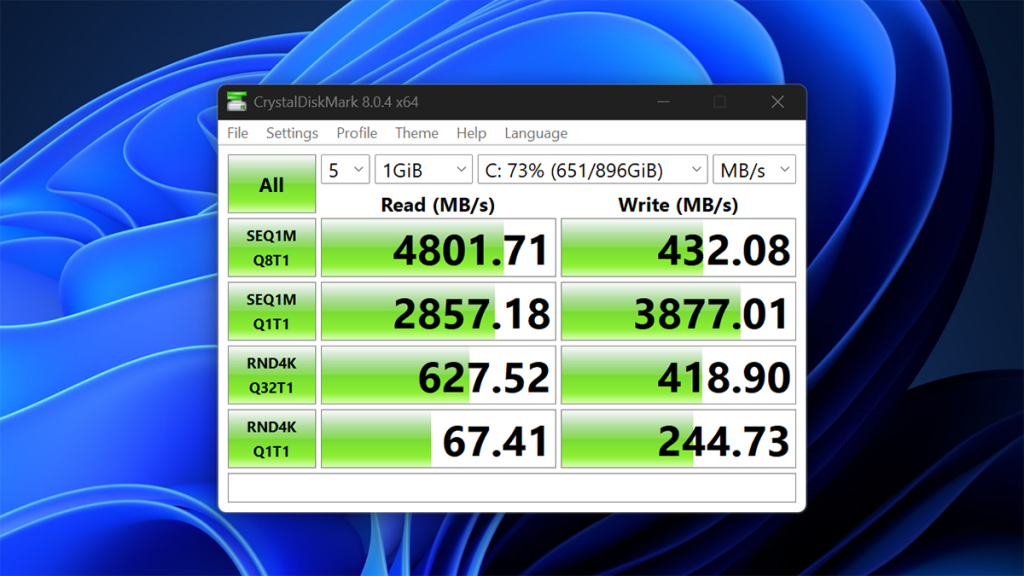
Performance is where things get complicated. The AMD Ryzen AI 7 350 inside the AERO X16 is pushed to an 80W TDP, delivering excellent multi-core performance that holds up even on battery. However, the RTX 5060 is capped at 85W, limiting its full potential. The biggest issue, though, comes from the bundled Kingston 1TB SSD. In stress tests, its write speeds dropped unpredictably, sometimes down to just a few hundred MB/s. This bottleneck slows down heavy tasks like video rendering and handling large project files.
CPU Benchmarks
Cinebench R23
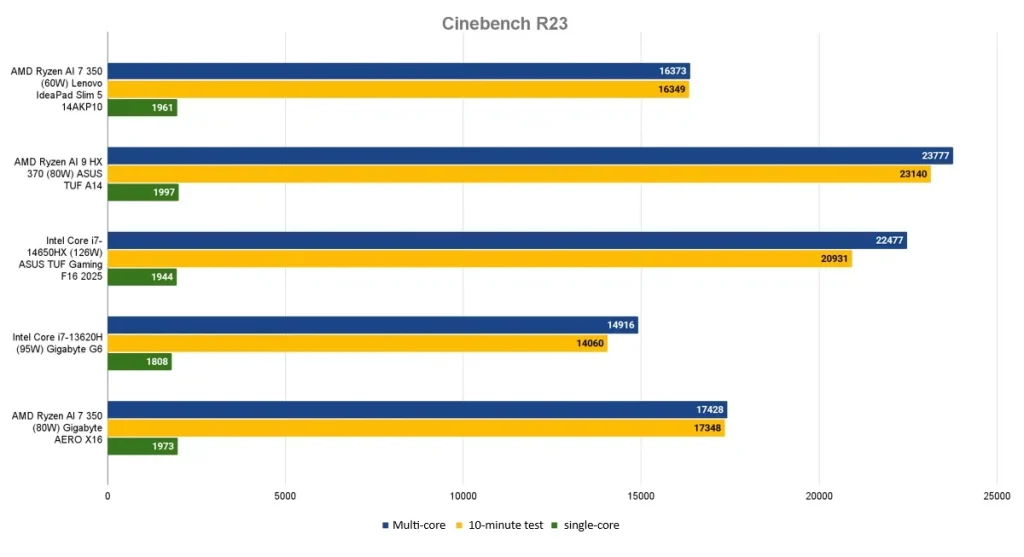
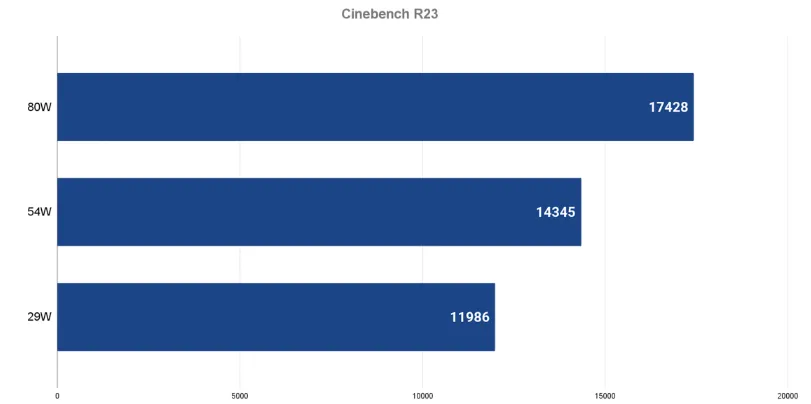
With the CPU running at a max 80W and stabilizing around 65W, the Ryzen AI 7 350 scored around 17,400 points in multi-core — on par with Intel’s Core i7-12700H and AMD’s Ryzen 9 8945HS. On battery at 54W, it still managed 14,300 points, and even in ultra power-saving mode at 29W, it reached nearly 12,000. That’s excellent efficiency per watt.
Cinebench 2024
Here, the AERO X16’s Ryzen AI 7 350 performed well, though not dramatically better than the same chip in ultrabooks. The upside: even after a 10-minute run, there was no performance drop. The downside: CPU temps hit 100°C, a result of the 80W power push. Personally, I think Gigabyte should have capped the CPU at ~60W. Performance would only dip 5–7%, but thermals would improve significantly. That change could also free up more power for the GPU, boosting it from 85W closer to 100W for better balance.
Geekbench 6
Surprisingly, the 80W configuration scored slightly lower than some 60W implementations I’ve tested on Lenovo laptops. This suggests Gigabyte’s software tuning still needs work.
GPU Performance and Gaming Tests
3DMark
In the Ray Tracing Speedway benchmark, the RTX 5060 at 85W outperformed even the RTX 4060 at 140W. But in the traditional Time Spy test, results were weaker at ~10,800 points, closer to an RTX 5050 115W. In Time Spy Extreme (4K), it matched the RTX 4060 140W, which is a decent outcome.
Cyberpunk 2077
This is where the new RTX 5000 series shines. Running at max settings with Ray Tracing Overdrive (including Path Tracing) in Full HD and Frame Generation 4 enabled, the AERO X16 delivered a steady 100 fps — smooth enough for an immersive experience. Turning off ray tracing pushed fps above 200, though oddly, the 85W RTX 5060 sometimes performed worse than the RTX 5050 115W in these scenarios. Disabling Frame Generation dropped fps to around 33, showing just how critical the new frame tech is for this generation of GPUs.
Gaming Performance
PUBG
At Full HD with Ultra settings, the AERO X16 delivered between 120–130 fps. This is solid performance, though only on par with laptops powered by the RTX 4060.
Forza Horizon 5
With the same Full HD and Ultra settings, the laptop reached around 175–180 fps, slightly higher than RTX 5050 laptops, which typically hit around 160 fps.
Black Myth: Wukong
In benchmark tests, performance was somewhat puzzling. The AERO X16 scored a little lower than an RTX 4060 75W in the Gigabyte G6, but still higher than RTX 5050-equipped machines. A big plus, however, was thermal control: GPU temperatures stayed at just 70–73°C during gameplay, showing how effective the cooling system and the chip’s efficiency really are.
Content Creation Performance
PugetBench
In Photoshop benchmarks, the AERO X16 scored exceptionally well — even surpassing the ASUS ROG Strix Scar 18 with a Core Ultra 9 275HX and RTX 5090 laptop GPU I previously tested. According to PugetSystems rankings, its score is on par with some high-end desktop setups. However, in Premiere, results were only average.
Adobe Premiere Pro
I tested two heavy projects, each over 50GB in size, recorded with a Sony camera at 100Mbps. One video was simple cuts with minimal effects (mostly GPU-dependent), while the other included many text animations (CPU + GPU load). Both projects were about 20 minutes long, exporting to files larger than 10GB.
The SSD bottleneck became obvious here. A simple project rendered in just 4 minutes, but saving it to the internal SSD took another 4.5 minutes, making the total 8.5 minutes. When exporting to an external SSD with 1GB/s speeds, the entire process dropped to just over 6 minutes. This clearly shows how much the bundled Kingston SSD slows down workflows. If Gigabyte had included a higher-quality SSD, the AERO X16 would have been far more appealing for creators.
Adobe Lightroom
I tested 500 RAW (CR2) images from a Canon camera, applying AI Masking and then exporting them to JPEG. AI Masking was reasonably fast, but JPEG export was noticeably slow. This makes the AERO X16 less ideal for heavy photo editing. In fact, if your main focus is photo editing and light video work, a MacBook still offers a smoother experience.
Battery Life: 76Wh for a Light Workday
The 76Wh battery lasted about 5 hours of YouTube playback or 3–4 hours of online work. This isn’t impressive, but understandable given the powerful hardware and 2K+ 165Hz display. Frequent travelers will likely need to keep the charger handy.
Should You Buy the Gigabyte AERO X16?
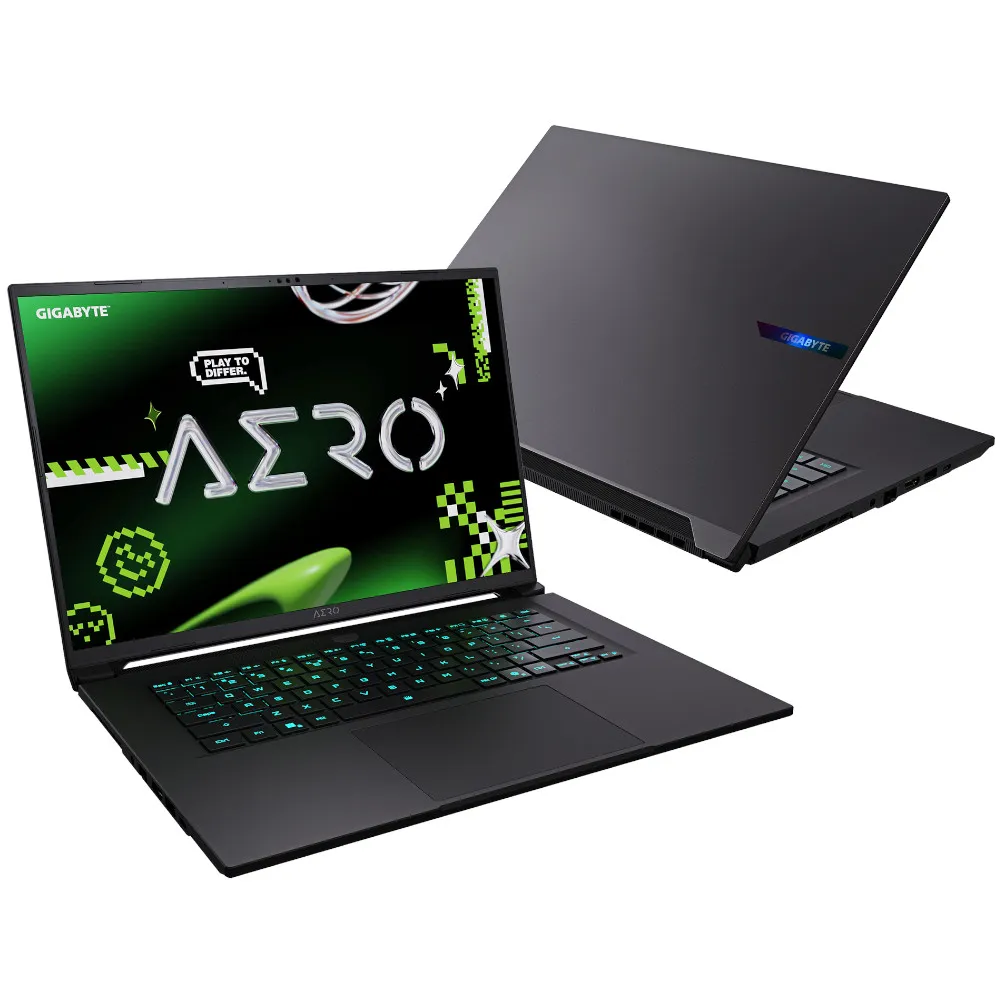
At around 1.500 USD, the Gigabyte AERO X16 offers plenty of strengths: a powerful Ryzen AI 7 350 CPU, the new RTX 5060 GPU, an excellent keyboard, and a smooth, responsive touchpad. These features make it a strong tool for both work and entertainment.
Of course, there are areas for improvement, such as the inconsistent SSD performance and the lack of an SD card slot. Still, these flaws don’t completely overshadow the overall experience. If Gigabyte improves its storage choice or optimizes performance further, the AERO X16 could easily become one of the most attractive laptops in the creator-focused segment.