CapCut and CapCut Pro are two powerful video editing tools developed by ByteDance. Many users wonder which version is better: the free or the paid one? In this guide, MiniToolAI breaks down the key differences between CapCut and CapCut Pro, helping you choose the best option based on your needs.
Overview: CapCut vs. CapCut Pro
CapCut (Free Version)
CapCut is a user-friendly video editing app suitable for beginners. It offers essential tools like trimming, adding music, filters, effects, text, and ready-made templates. It’s a great choice for basic video editing, especially for personal use or social media content.
CapCut Pro (Paid Version)
CapCut Pro unlocks advanced features for professional-grade editing. With the Pro version, users can:
- Remove watermarks
- Edit in 4K
- Use AI tools like background removal, skin smoothing, motion tracking
- Access premium effects, music, and fonts
- Enjoy cloud storage and cross-device syncing
If you’re serious about content creation or need high-quality outputs, CapCut Pro is the better option.
CapCut vs. CapCut Pro: Feature Comparison
| Feature | CapCut Pro | CapCut (Free) |
|---|---|---|
| Cost | Paid (monthly/yearly) | Free |
| Effects & Transitions | Full access to premium effects | Basic effects only |
| Watermark | No watermark | Watermark present |
| Ads | Ad-free experience | Ads included |
| Audio | Royalty-free music, voice isolation | Music for TikTok use only |
| Image Editing | Advanced filters and controls | Limited filters |
| AI Features | Auto video from text, script generation, URL-based product detection | Basic character modeling and conversion |
| Fonts | Unlock creative and commercial fonts | Standard fonts only |
| Subtitles | Multi-language auto-subtitles, professional styles | Basic subtitles, no language support |
| Cloud Storage | Up to 100GB, fast sync | 1GB with upgrade options |
| Templates | Access to thousands of community and pro templates | Limited basic templates |
| Platforms | iOS, Android, Web, macOS, Windows | Same as Pro |
| Export Quality | Up to 4K video, 640p GIF | Up to 1080p video, 240p GIF |
Standout Features of CapCut and CapCut Pro
CapCut (Free):
- Trending Templates: Create popular-style videos easily with basic templates.
- Limited Licensed Music/Fonts: Usable mainly on TikTok and CapCut, may be restricted elsewhere.
CapCut Pro:
- Premium Templates: Exclusive, high-quality designs to make your videos more professional.
- Advanced AI Editing Tools: Includes smart background removal, facial recognition, auto beauty, voice editing, etc.
- Video Stabilization: Makes handheld or fast-moving clips smoother, ideal for creators shooting on the go.
CapCut Pricing Plans
CapCut offers three main subscription tiers: Standard, Pro, and Teams.
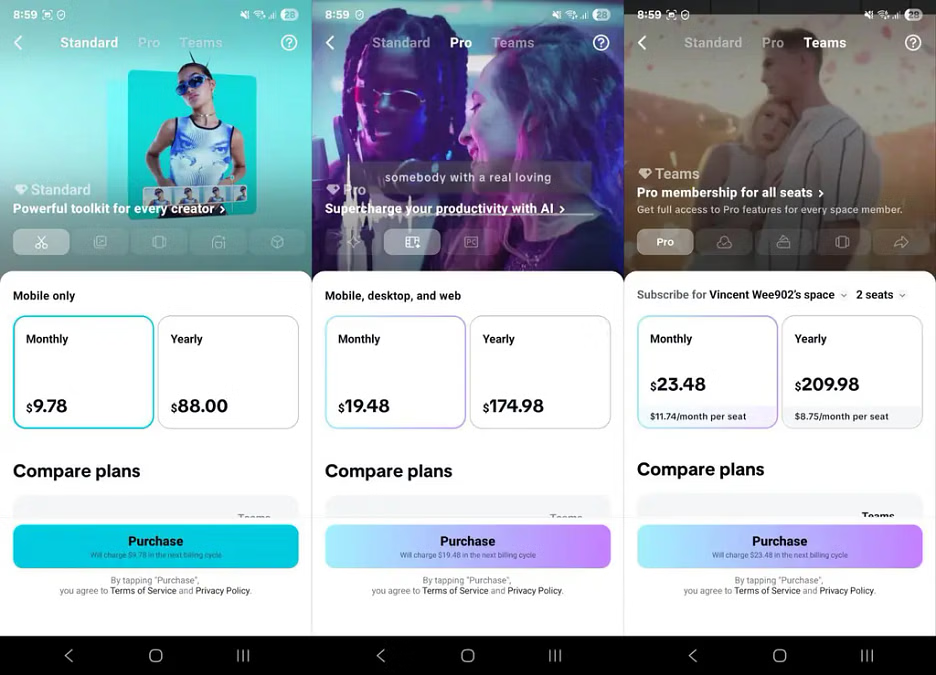
Standard Plan
Powerful toolkit for every creator
- Platform: Mobile only
- Monthly: $9.78
- Yearly: $88.00
Pro Plan
Supercharge your productivity with AI
- Platform: Mobile, desktop, and web
- Monthly: $19.48
- Yearly: $174.98
Teams Plan
Pro membership for all seats (includes all Pro features for team members)
- Monthly: $11.74 per seat
- Yearly: $8.75 per seat/month
💡 Tip: CapCut often offers discounts for first-time users or during special promotions. Prices may vary depending on platform and region.
Which One Should You Choose?
CapCut (Free) is perfect for:
- Beginners or casual users
- Social media creators on a budget
- Basic video editing and TikTok videos
CapCut Pro is ideal for:
- Content creators and professionals
- Users needing advanced features, AI tools, and no watermarks
- Those who want high-resolution videos and cross-device syncing
Final Thoughts
Choosing between CapCut and CapCut Pro depends on your content goals and budget. With this comparison from MiniToolAI, you now understand the differences clearly and can pick the version that best supports your creative workflow.
🎬 Ready to level up your video editing? Whether you stick with the free tools or upgrade to Pro, CapCut offers a powerful platform to bring your ideas to life.
Frequently Asked Questions (FAQs)
When should I use CapCut Free or CapCut Pro?
If you’re a casual user looking to make simple edits—such as trimming, adding music, and using basic templates—the free version of CapCut is more than enough.
However, if you’re a professional content creator who needs high-quality videos, watermark-free exports, premium templates, and advanced editing tools, CapCut Pro is the better choice.
Does CapCut Pro offer a free trial?
Yes, CapCut Pro offers a 7-day free trial. During this period, you can try all premium features without restrictions.
⚠️ Note: Be sure to cancel before the trial ends if you don’t want to be charged. The subscription will automatically renew based on the selected plan.
Should I stick with CapCut Free or upgrade to Pro?
Your decision depends on your editing needs:
- Use CapCut Free if you:
- Edit videos occasionally
- Need basic tools for personal or social use
- Are experimenting with video content creation
- Choose CapCut Pro if you:
- Create videos regularly or professionally
- Need 4K exports, AI editing tools, and cloud storage
- Want to avoid watermarks and ads
Final Recommendation
CapCut offers excellent flexibility for all types of users. The free version is perfect for beginners, while the Pro version unlocks the full power of video editing for professionals.
👉 With this complete comparison by MiniToolAI, you’re now ready to decide which version suits you best. Whether you’re creating TikTok videos or high-end marketing content, CapCut has a solution to match your vision.