There are tons of free speech-to-text tools online today – but let’s be honest, most of them fall short. If you’ve ever tried transcribing complex audio (like interviews, multilingual conversations, or music with background noise), you’ve probably noticed how inaccurate and frustrating they can be.
On the other hand, many premium tools offer better quality – but at a price that quickly adds up.
In this post, I’ll walk you through a simple way to use a high-quality speech-to-text tool powered by advanced AI from MiniToolAI. It delivers highly accurate transcriptions at a cost of less than 1 cent per minute – one of the most affordable options available right now. Even better, you can try it for free before spending anything.
What Is Speech-to-Text?
Speech-to-text (also known as voice recognition or automatic transcription) is a technology that converts spoken audio into written text.
It’s widely used in:
- Transcribing meetings and interviews
- Creating subtitles for videos
- Converting podcasts into blog content
- Taking voice notes quickly
- Processing customer calls or recordings
Modern AI-powered speech-to-text tools go beyond simple transcription. They can:
- Detect multiple speakers (speaker recognition)
- Identify different languages automatically
- Handle noisy or low-quality audio
- Add timestamps for each sentence
This makes them incredibly useful for both personal and professional use.
Step-by-Step Guide: Try Speech-to-Text Online for Free
Step 1: Log in and Get Free Credits
Go to the MiniToolAI login page: https://minitoolai.com/login.php
Click “Continue with Google” to sign in.
As a first-time user, you’ll receive $0.1 in free credits, which equals about 13 minutes of transcription. That’s more than enough to test the tool.
Step 2: Choose the Speech-to-Text Tool
Once you’re on the homepage, select the Speech-to-Text feature.
Step 3: Upload Your Audio File
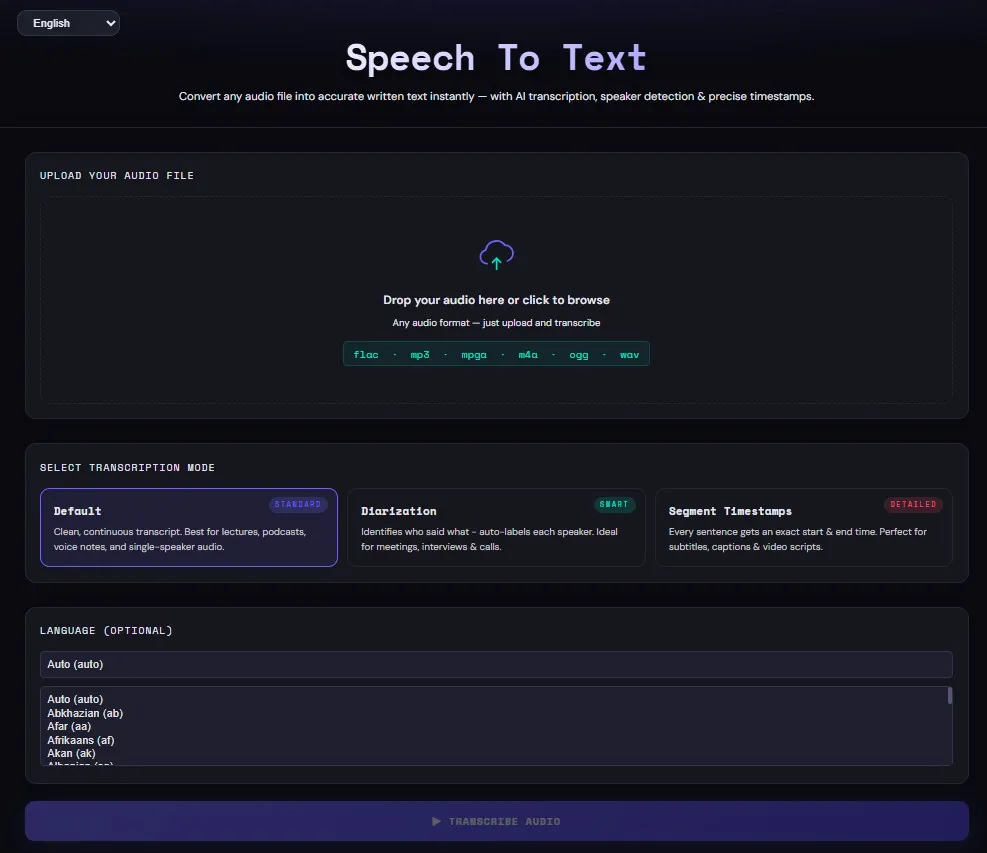
In the “Upload your audio file” section, choose your file.
Supported formats include:
- MP3
- FLAC
- MPGA
- M4A
- OGG
- WAV
Maximum file size: 25MB
Step 4: Select Transcription Mode
You’ll see three options:
- Default: Clean, continuous text output. Best for lectures, podcasts, voice notes, and single-speaker audio.
- Diarization (Speaker Recognition): Automatically identifies who said what. Perfect for meetings, interviews, and calls.
- Segment Timestamps: Adds start and end time for each sentence. Ideal for subtitles, captions, and video editing.
Step 5: Choose Language (Optional)
You can skip this step – the AI will detect the language automatically.
However, selecting the correct language can improve both speed and accuracy.
Step 6: Click “Transcribe Audio”
Hit the button and wait a few seconds.
You’ll receive a high-quality transcription with excellent accuracy almost instantly.
Why I Recommend MiniToolAI Speech-to-Text
1. High Accuracy
The tool is powered by advanced AI models, which deliver reliable results even with:
- Noisy recordings
- Multiple speakers
- Mixed languages
Compared to most free tools, the difference is noticeable right away.
2. Extremely Affordable Pricing
After testing several tools, here’s what I found:
- Free tools → Low accuracy, often unusable
- Paid tools → Around $0.2-$0.3 per audio file or higher
MiniToolAI costs only $0.0078 per minute, making it one of the cheapest options available.
With MiniToolAI’s Speech-to-Text, the cost is just $0.0078 per minute. You can try it for free with $0.1 in credits (equivalent to ~13 minutes), which you receive when you log in for the first time using Google.
3. Beginner-Friendly Interface
The interface is clean and simple.
You don’t need any technical skills – just upload your file, choose a mode, and click a button.
4. Multilingual Support
One of the standout features is its strong multilingual capability. MiniToolAI’s Speech-to-Text supports most major languages worldwide, making it suitable for global users and diverse audio content.
Whether your audio includes English, Spanish, French, German, Vietnamese, Japanese, Korean, or even mixed languages in the same file, the AI can automatically detect and transcribe it with high accuracy. This is especially useful for international meetings, multilingual podcasts, or cross-border content creation.
5. Fast Processing Speed
One thing I really like about this tool is how fast it is. You don’t have to wait minutes for results like with some older transcription services.
In most cases, it only takes a few seconds to process your audio and generate a full transcript. This is especially helpful if you’re working with multiple files or need quick turnaround for content creation, meetings, or subtitles.
6. Handles Noisy & Complex Audio Well
Not all audio is clean – and that’s where many tools fail.
MiniToolAI’s Speech-to-Text performs surprisingly well even with difficult audio conditions such as:
- Background noise (music, crowd, environment sounds)
- Multiple speakers talking in the same file
- Low-quality or recorded audio
- Mixed languages in a single conversation
This makes it a reliable choice for real-world use cases, not just perfect studio recordings.
7. No Installation Required (100% Online)
You don’t need to download or install anything. Everything works directly in your browser.
This means you can use the tool anytime, anywhere – whether you’re on a laptop, PC, or even a tablet. Just log in, upload your file, and start transcribing instantly.
It’s perfect if you want a quick, hassle-free “speech-to-text online” solution without dealing with software setup.
8. Privacy & Security
When working with audio files – especially meetings or interviews – privacy matters.
MiniToolAI is designed with user privacy in mind. Your uploaded files are processed securely, and the system does not store or share your data unnecessarily.
This gives you peace of mind when transcribing sensitive content such as business calls, client conversations, or internal recordings.
Use Cases of Speech-to-Text
Speech-to-text technology can be applied in a wide range of real-world scenarios, making it a powerful tool for both individuals and businesses. For content creators, it helps turn podcasts, YouTube videos, or voice recordings into blog posts quickly. In business settings, it’s commonly used to transcribe meetings, interviews, and customer calls – especially useful when combined with speaker recognition to track who said what. Students and professionals can use it to convert lectures or brainstorming sessions into organized notes. It’s also ideal for creating subtitles and captions for videos, improving accessibility and SEO. Whether you’re saving time, boosting productivity, or repurposing content, speech-to-text can streamline your workflow significantly.
Who Should Use This Tool?
This speech-to-text tool is designed for a wide range of users who want to save time and improve productivity when working with audio content.
- Content Creators – Turn audio recordings into blog posts, articles, or social media content quickly and efficiently.
- YouTubers – Generate accurate subtitles and captions to improve SEO and audience engagement.
- Podcasters – Convert podcast episodes into written content for websites, show notes, or repurposing.
- Students – Transcribe lectures, online classes, or study notes without manual typing.
- Marketers – Extract insights from interviews, webinars, and customer feedback recordings.
- Remote Teams – Easily document meetings, calls, and discussions – especially useful with speaker recognition.
If you regularly work with audio in any form, this tool can help you save hours of manual transcription work.
Final Thoughts
If you’ve been struggling with low-quality transcription tools or expensive services, this is definitely worth trying.
MiniToolAI offers a great balance between accuracy, speed, and cost, and the free trial makes it easy to get started without commitment.
Give it a try and see how much time you can save with reliable speech-to-text transcription.