Artificial Intelligence has taken a major leap forward — now, you can create stunning, ultra-realistic videos from just a few lines of text. Yes, you read that right. With the power of AI video generation tools, anyone can transform an idea into a professional-looking video without any filming or editing skills. So how does it work, and how can you make the most of it? Let’s dive into this step-by-step guide on creating high-quality AI-generated videos, optimized for both beginners and professionals.

What Is AI Video Generation?
AI video generation is the process of using artificial intelligence tools to turn text prompts, images, or both into video content. You simply input a written description — and optionally upload a reference image — and the AI tool will generate a video that matches your vision. It’s a game-changing solution for marketers, content creators, educators, architects, and more.
What Styles of Videos Can AI Create?
One of the most impressive aspects of AI video generators is their stylistic flexibility. You can request a wide range of visual aesthetics, such as:
- Photorealistic
- Cartoon or Animated
- 3D Rendered
- Cinematic / Movie-like
- Fantasy or Sci-Fi
- Minimalist or Abstract
All you need to do is include the desired style in your prompt — for example: “A cinematic city skyline at sunset, ultra-realistic, slow pan shot.”
How Does AI Video Generation Work? (Simplified Science)
At its core, AI video generation relies on deep learning models trained on massive datasets of images and videos. These models learn patterns of motion, texture, light, and subject behavior. When you provide a prompt, the AI decodes it and predicts what a video matching that description would look like frame by frame. Some tools use diffusion models to generate each frame, while others employ generative adversarial networks (GANs) for more stylized results.
While the technology behind it is advanced, the user experience is simple — you just describe what you want, and the AI brings it to life.
Practical Applications of AI Video Tools
AI video generators are revolutionizing multiple industries. Here are just a few practical ways you can use them:
🔹 Marketing & Advertising
Create product videos, explainer videos, or promotional content for TikTok, Instagram, Pinterest, Facebook Reels, and YouTube Shorts.
🔹 Architecture & Real Estate
Generate architectural walkthroughs or 3D-style renderings of spaces for client presentations.
🔹 Social Media Content
Make engaging short videos in seconds without needing a film crew or editing skills.
🔹 Education & E-learning
Visualize complex concepts with short animated clips or demonstration videos.
🔹 Entertainment & Storytelling
Prototype movie scenes or create mood-setting videos for creative pitches.
There are many other creative applications of AI video generator, feel free to share your ideas with me!
Limitations of AI Video Generators
While this technology is powerful, it still has a few limitations:
- Video Duration: Most tools generate short clips, usually between 5 to 10 seconds. For longer videos, you can stitch multiple clips together using the final frame of one as the input for the next.
- Famous Personalities: Due to legal and ethical concerns, many tools restrict the use of celebrity likenesses.
- Audio Support: AI-generated videos typically don’t include sound. You’ll need to add background music, voiceovers, or sound effects using separate tools like text-to-speech or audio editors.
Still, with ongoing development, we may soon reach a point where you can create full-length films in just minutes.
Can You Tell the Difference Between AI and Real Footage?
In most cases, yes — but only if you look closely. AI-generated videos can be hyper-realistic, but subtle details like unnatural motion, lighting inconsistencies, or texture artifacts may give them away. However, for marketing, concept visualization, or short-form content, AI videos can be indistinguishable from real footage.
Is AI Video Generation Free?
While some tools offer free trials or basic features, high-quality results usually come at a cost. Free tools often produce low-resolution or glitchy videos. Premium platforms offer better quality and more customization, with pricing that typically ranges from $0.30 to a few dollars per video — a small price to pay compared to traditional video production.
Step-by-Step: How to Create High-Quality AI Videos with MiniToolAI
Here’s how to create stunning videos using Mini Tool AI:
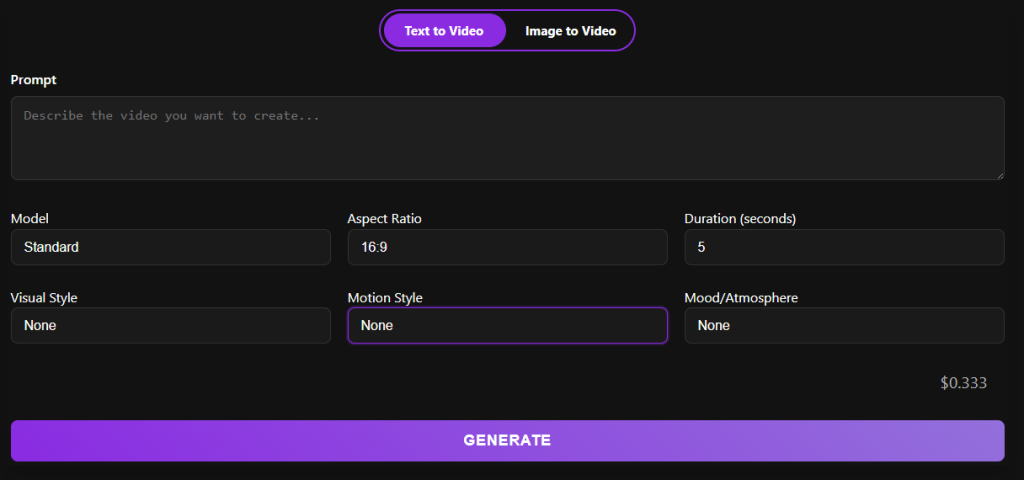
Step 1: Visit the Platform
Go to minitoolai.com and select the Video Generator tool.
Step 2: Choose a Mode
- Text to Video: Just type your prompt.
- Image to Video: Upload an image (optional text prompt for added context).
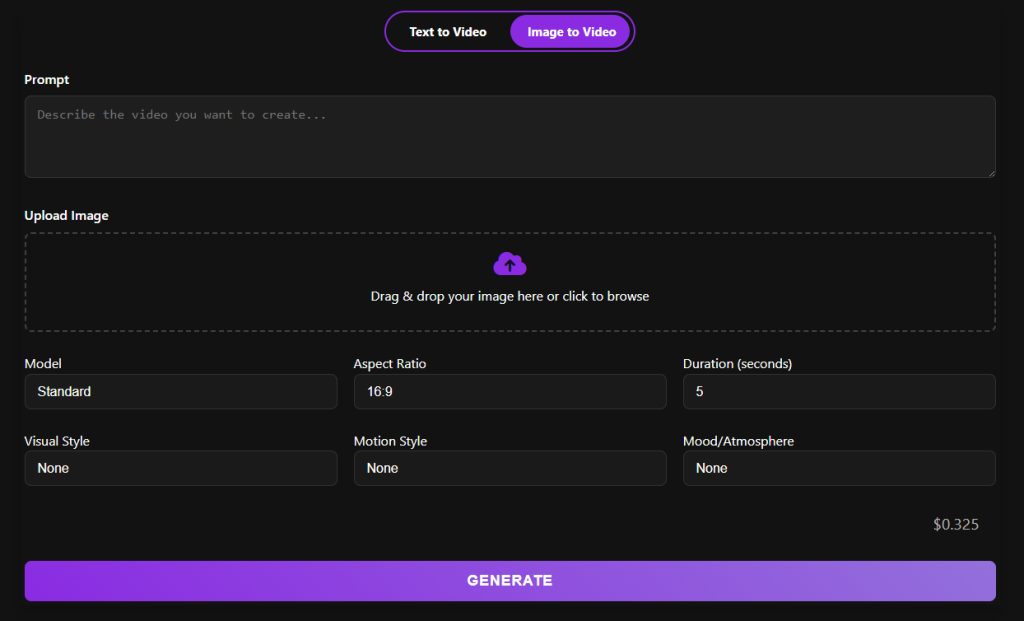
Step 3: Configure Video Settings
- Model: Choose between Standard (faster, cost-effective) or High Quality (for top-tier visuals).
- Aspect Ratio: Pick from options like 16:9 or 9:16.
- Duration: High Quality supports 5–8 seconds; Standard supports 5 or 10 seconds.
Step 4: Set the Style
Customize the visual style, motion, and mood. If the exact style you want isn’t listed, you can describe it directly in your prompt.
Step 5: Click “Generate”
Wait 30–60 seconds — your video will be ready for download and review.
The Ultimate Guide to Crafting Effective Prompts for AI Video Creation with MiniToolAI
Unlock the full creative potential of MiniToolAI AI Video Generator by mastering the art of prompt crafting. Whether you’re producing cinematic content, marketing videos, or storytelling clips, knowing how to use film-centric language can dramatically improve the quality and accuracy of your AI-generated videos.
In this guide, we’ll walk you through best practices for writing powerful prompts that deliver visually compelling results—and help you create content that stands out in any niche.
Use Film Language to Direct Your AI Videos
MiniToolAI is designed to understand and interpret a wide range of cinematic terms. By using specific language from the world of filmmaking, you can guide the AI more precisely. Here are the key categories you should explore:
1. Framing and Shot Types
Control how subjects appear on screen by specifying:
- Single frame (one person or object in focus)
- Dual subject (two key characters in the shot)
- Over-the-shoulder view (perfect for conversations or storytelling scenes)
2. Camera Angles and Movements
Shape your scene’s dynamics using phrases like:
- Eye-level shot (neutral, natural perspective)
- High-angle view (to show vulnerability or scale)
- Low-angle shot (to evoke power or dominance)
- Dolly movement, zoom effect, pan, and tracking (to add cinematic motion)
3. Lens Techniques and Focus
Create mood and visual depth by specifying:
- Shallow depth of field (for dramatic focus)
- Macro view (extreme close-up on small subjects)
- Wide-angle perspective (to show expansive environments)
4. Style and Scene Description
Guide the tone of the video with clear genre and setting cues:
- Genres: sci-fi, rom-com, animated short, action thriller
- Settings: urban skyline, natural landscapes, wildlife, futuristic city, or vintage streets
Prompt Ideas to Inspire Your Next AI Video
MiniToolAI responds well to creatively detailed prompts. Here are a few prompt variations that show how small changes can lead to vastly different outcomes:
- Basic Prompt: “A woman walking in the city”
- Enhanced Prompt: “A young woman walks through a neon-lit Tokyo street at night, close-up shot, panning camera, cyberpunk style”
The more descriptive your prompt, the more accurate and cinematic your video output.
AI Safety and Content Moderation
MiniToolAI includes robust content moderation tools to ensure all generated media meets community standards. Inappropriate or harmful prompts are automatically filtered to maintain a safe creative environment for all users.
Prompt Crafting Fundamentals: What to Include
For optimal results, build your prompt around these key elements:
- Subject: Who or what is the focus? (e.g., a dancer, a tiger, a sports car)
- Setting: Where does the scene take place? (e.g., jungle, desert, city skyline)
- Activity: What is the subject doing? (e.g., running, performing, flying)
- Visual Style: Specify mood or genre (e.g., noir, fantasy, cartoon-style)
- Camera Techniques (Optional): Aerial view, slow zoom, etc.
- Shot Composition (Optional): Close-up, wide shot, over-the-shoulder
- Mood & Lighting (Optional): “sunset lighting,” “cool tones,” “moody atmosphere”
Bonus Tips for Better AI Video Prompts
- Be specific: “A happy dog running through a park on a sunny day” is better than “a dog outside.”
- Use visual cues: Mention colors, lighting, and atmosphere.
- Name artistic styles: For a unique aesthetic, include descriptors like “anime-style,” “film noir,” or “hand-drawn animation.”
- For portraits: Add terms like “facial detail,” “high-resolution portrait,” or “soft lighting on the face.”
Final Thoughts
AI-powered video generation is no longer a futuristic dream — it’s here, and it’s remarkably accessible. Whether you’re a creator, marketer, educator, or entrepreneur, you can now produce professional-grade videos with zero filming experience.
So why wait? Start experimenting with AI video tools today, and transform your ideas into reality in just a few clicks.