Want to own a set of cool, personalized stickers without design skills? Thanks to AI technology, you can now create custom stickers super fast and easily in just a few steps! Let’s explore how to make your own personalized stickers with MiniToolAI Blog.
Why Try Creating Stickers with AI?
- Save time and effort: No need for complex software or outside help – create stickers with just a few simple actions and brief descriptions
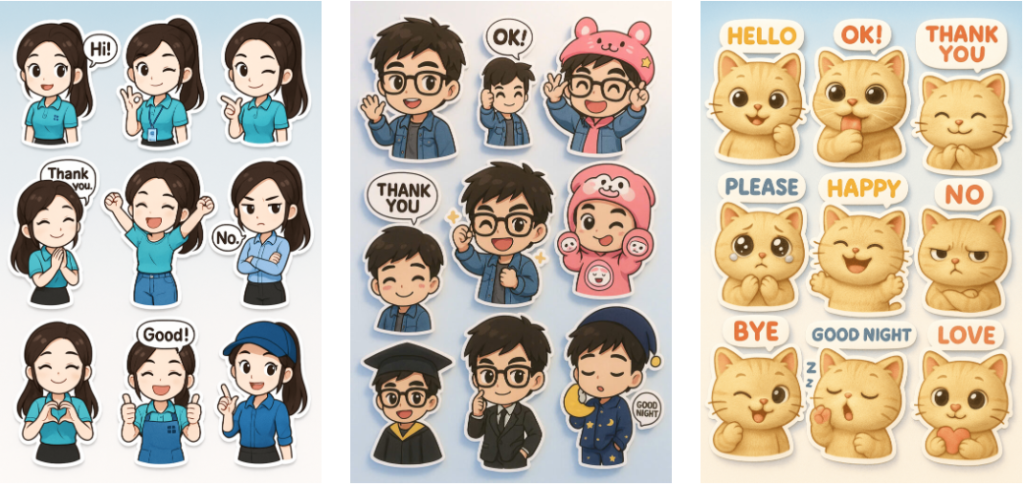
- Express your personality freely: Easily customize outfits, expressions, and activities to create stickers that reflect your unique personal style
- Share across multiple platforms: Use your stickers in messages, as profile pictures, cover photos, or post them on social media like Instagram, Facebook, and Zalo
- No design skills required: Skip learning Photoshop or Illustrator – just describe your idea and the AI will automatically generate complete images, making it user-friendly for everyone
Simple Steps to Create Personal AI Stickers
Step 1: Access an AI tool Visit ChatGPT at https://chatgpt.com/ or any AI tool that supports image generation.
Step 2: Upload a portrait photo Choose a clear photo showing your full face, hair, and outfit for better AI recognition.
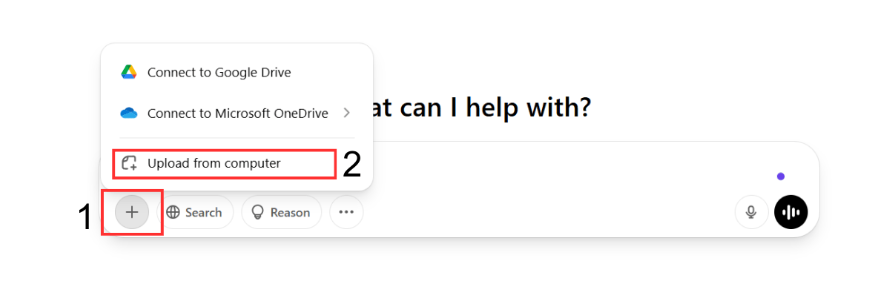
Step 3: Enter a prompt You can use this prompt in ChatGPT 4 (version with image support):
Create a 3D kawaii a 10:16 canvas featuring nine chibi-style stickers in various outfits. Each character appears in different poses and expressions. Use the attached image as a reference. Each sticker has a white border and includes a speech bubble with regular use phrases. The background features a soft gradient from white to light blue, creating a joyful and positive vibe.
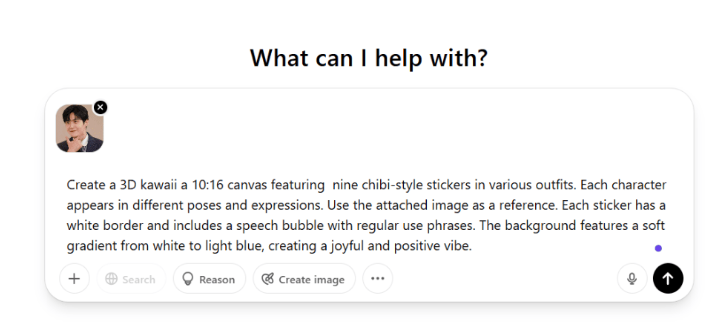
Step 4: Wait for AI processing
Step 5: Download your image Click the Download button to save the image to your device.
Tips to Make Your Stickers Look Cooler
To make your stickers stand out, prioritize selecting colors that match your personality. Bright colors work well for energetic people, while subdued or pastel tones suit a more gentle, sophisticated style.
Expressions are also crucial – prioritize fun or unique facial expressions to create impact and make a memorable impression in conversations.
Instead of using just a few individual stickers, create a diverse collection with various expressions. This gives you more options when communicating and allows you to express different emotional nuances in your interactions.
Conclusion
Creating personal stickers with AI is an excellent way to express yourself in a unique, distinctive, and creative manner. Try it today and don’t forget to share your “signature” sticker collection with MiniToolAI Blog!