Meta AI is an advanced AI-powered search assistant developed by Meta, now officially available in Vietnam. With its smart and versatile features, Meta AI is designed to help users search for information, generate content, and interact in a natural, efficient way. In this guide, we’ll explore what Meta AI is and show you how to use it for free on both mobile and desktop through Messenger.

✅ What is Meta AI?
Launched in Vietnam on December 4, 2024, Meta AI is an artificial intelligence tool developed by Meta—the parent company of Facebook and Instagram. Built on the powerful LLaMA 3 language model, Meta AI enables users to chat, search, and create content quickly and accurately, much like ChatGPT or Google Gemini.
It’s already integrated into popular platforms like Facebook, Instagram, and Messenger, so you can easily access it on your smartphone or computer without needing to download anything extra.
🔍 Key Features of Meta AI
1. User-Friendly Interface & Natural Language Processing
Meta AI offers a clean, intuitive interface that’s easy for users of all ages to navigate. It supports natural language input, meaning you can ask questions or make requests just like you would with a human—and get accurate, relevant responses.
Note: It filters out inappropriate or sensitive content automatically for a safer user experience.
2. Fast and Reliable Responses
Whether you’re looking for quick answers, up-to-date news, or help with general knowledge, Meta AI responds rapidly with trustworthy information across a wide range of topics.
3. Facebook & Instagram Post Insights
Meta AI can help explain, analyze, and fact-check posts you come across on Facebook or Instagram, offering insights when supported by credible sources.
4. Text Translation & Summarization
Need to translate something? Meta AI supports over 20 languages and counting. It can also summarize long texts into concise overviews—saving you time on reading and research.
5. Creative Content Generation
From poems and stories to social media posts, emails, and even code—Meta AI can generate a wide range of content types. It’s also great for brainstorming ideas for personal projects or professional tasks.
6. Text-to-Image Creation
Using DALL-E technology, Meta AI can generate basic illustrations or abstract images from your written prompts. While still limited in complexity, this feature opens doors for creative visual content.

7. Cross-App Integration
Meta AI is integrated across multiple apps including Facebook, Instagram, WhatsApp, Threads, Microsoft Office, Google Docs, and Slack. In Vietnam, full integration is still rolling out, but it can currently be accessed via Facebook Messenger.
📱 How to Use Meta AI on Your Phone
Note: Make sure your Messenger app is updated to the latest version. This works on both Android and iPhone.
Method 1: Chat Directly in Messenger
- Open the Messenger app.
- Tap the Meta AI icon.

- Type your question or request in the chat box—Meta AI will respond instantly.
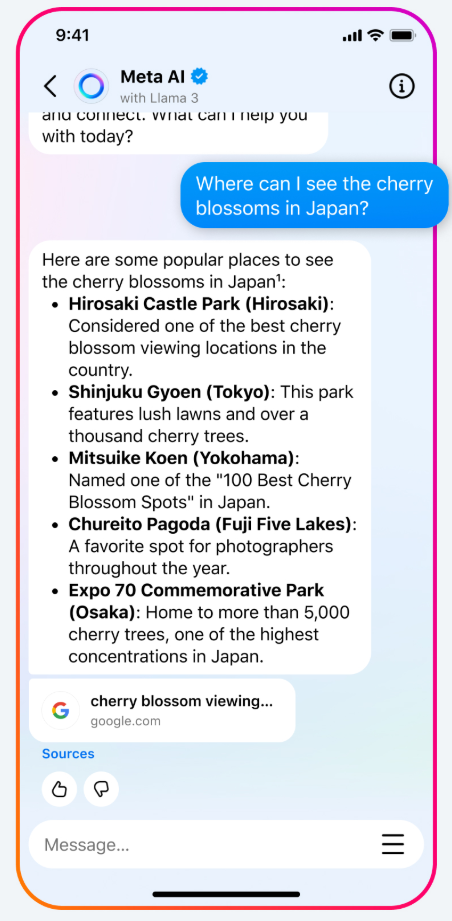
Meta AI also suggests popular topics right above the input box to help guide your questions.
Method 2: Use the Search Bar
- Open Messenger.
- Type your query directly in the search bar at the top.
- Tap one of the suggested prompts or hit enter—Meta AI will take you to a chat window with a real-time response.
You can also react to its replies with thumbs up or down to give feedback.
💻 How to Use Meta AI on Your Computer
- Visit the official Meta AI website on your desktop or laptop.
- Click “Log in” and choose to sign in via Facebook or Instagram.

- Enter your request in the chat window—Meta AI will generate a response immediately.
You’ll also see suggested topics in image format that you can click on for quick answers. Additional features include starting a new conversation, saving chats, or deleting previous ones.
⚠️ Tips for Using Meta AI Safely & Effectively
- Protect your privacy: Don’t share personal details like your phone number, address, passwords, or banking info.
- Avoid inappropriate content: Don’t generate or request content that’s violent, offensive, or violates copyright.
- Be clear and specific: Use natural, detailed language to help Meta AI understand your queries better.
- Explore all features: Use it for studying, content creation, research, and personal skill development.
- Verify facts: Double-check important info from Meta AI before using it in serious contexts.
Meta AI brings powerful, intelligent tools right to your fingertips. Whether you’re working, studying, or just exploring ideas, this AI assistant can make your experience smarter and more creative. Try it out on Messenger today and see what it can do for you!